


 エーテル
エーテル📶 In California, your smartphone is your lifeline.
Disneyland entry, Uber pickups at LAX, Dodgers digital tickets — everything runs on a stable connection. Lose it at the wrong moment, and a great trip turns stressful fast. That’s why I — a self-described cautious traveler — never rely on a single line.
In this article, I share real speed test data from Irvine, Orange County so you can make an informed choice before you land.
Why I Tested These in Irvine, California
Most connectivity reviews online are either sponsored content, or they only compare data caps and prices — with no actual speed numbers, no real location, no honest trade-offs.
I wanted something different: real Speedtest results from the same spot in Irvine, for the three connections I personally used during my January 2026 trip to California.
Why does this matter for your trip?
- At Disneyland, the official app handles park entry QR codes, Lightning Lane, and mobile food orders. A lagging connection in the entry queue is a real problem.
- At Dodger Stadium, digital tickets and Uber home both need reliable data.
- At LAX, the Mobile Passport Control (MPC) app can cut your immigration wait dramatically — but only if your internet is live the moment you land.
If you lose connection mid-Uber ride or at the immigration hall, it’s not just annoying — it’s a safety risk. That’s why I always carry two lines.
Speed Test Results: Airalo vs Pocket WiFi in Orange County
⚠️ Disclaimer: Network quality varies by location, time of day, congestion, device, and contract terms. These results are from a specific spot in Irvine, Orange County. Measurement times were not identical across providers. Use as a reference, not a guarantee.
Summary Comparison Table
| Provider | Download | Upload | Ping | Best For |
|---|---|---|---|---|
| Airalo (eSIM) | 182.03 Mbps | 46.37 Mbps | 149 ms | On-the-go / Heavy downloads / File uploads |
| Global WiFi (Pocket WiFi) | 44.49 Mbps | 27.40 Mbps | 37 ms | Meetings / Calls / Real-time apps |
| [Backup Line] | 90.53 Mbps | 2.79 Mbps | 415 ms | Emergency fallback → details below |
Airalo (eSIM) — Download & Upload Powerhouse
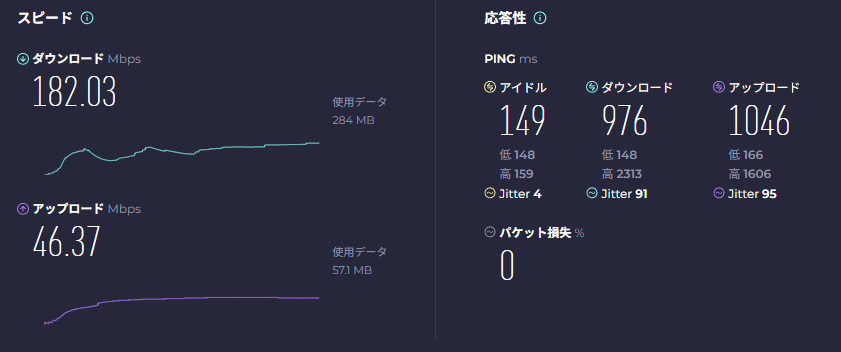
| Metric | Result |
|---|---|
| Download | 182.03 Mbps |
| Upload | 46.37 Mbps |
| Ping | 149 ms |
Verdict: Exceptional LTE performance — faster than most hotel Wi-Fi in the Irvine area. The high upload (46 Mbps) makes it strong for sending photos, video uploads, and backup use cases. The 149ms ping is worth noting if real-time responsiveness is critical.
Best for: Moving around all day · Downloading the Disneyland app before entering the park · Uploading photos and videos · Always-on access without carrying an extra device
Global WiFi (Pocket WiFi) — The Ping Champion
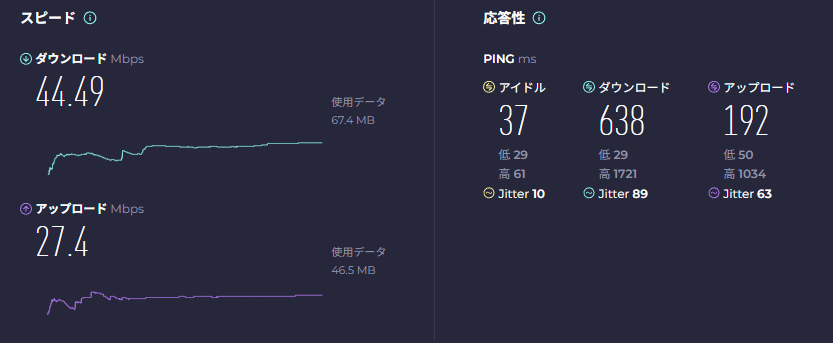
| Metric | Result |
|---|---|
| Download | 44.49 Mbps |
| Upload | 27.40 Mbps |
| Ping | 37 ms |
Verdict: 37ms ping is outstanding — comparable to home fiber internet in Japan. Download is lower than Airalo, but for anything requiring real-time responsiveness (video calls, voice, live Uber tracking), this wins decisively.
Best for: Zoom / Teams meetings · VoIP calls · Ride-hailing apps (Uber, Lyft) · Any situation where lag is unacceptable
Honest note: This was measured late at night. Pocket WiFi performance also varies by your position inside a hotel room. More importantly — I was on a 1GB/day plan, which ran out faster than expected when working from a laptop. For a business trip, I strongly recommend the 5G Unlimited plan.
What DL / UL / Ping Actually Mean for Travelers
Not a tech person? Here’s what matters on a real trip:
- Download (DL): How fast data comes to you — app loading, map rendering, video playback
- Upload (UL): How fast data goes from you — video call quality, sending photos, live streaming
- Ping: Round-trip response time — how instant everything feels
For travel and business trips, ping and upload often matter more than download — yet most reviews only talk about download speeds.
Ping in plain English
| Ping | What it feels like |
|---|---|
| ~37ms (Global WiFi) | Near-instant. Video calls feel like the other person is in the room. |
| ~149ms (Airalo) | A slight delay, but mostly fine for everyday tasks. |
| ~415ms | Every tap takes 0.4+ seconds. Uber map updates stutter. Google Maps lags. |
A 415ms ping means your Uber driver’s location updates 0.4 seconds late — every single refresh. At Disneyland, the wait time display loads a beat after you tap. For a Zoom call with a client, the conversational lag becomes uncomfortable within minutes.
The Professional’s Secret: Why I Always Carry a Backup Line
This section covers something you won’t find on most English-language eSIM review sites — because most English reviewers have never tested a Japanese carrier abroad.
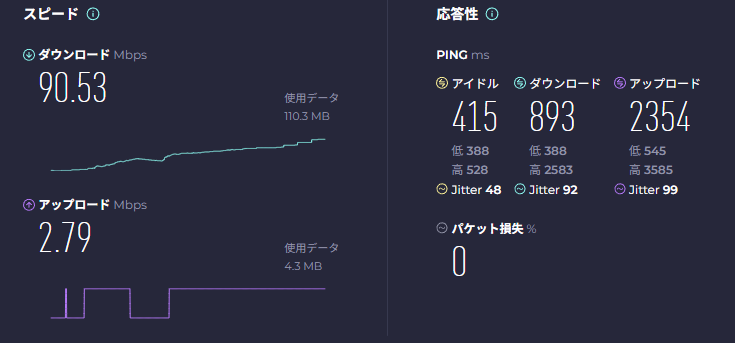
After relying on Airalo and Global WiFi as my main connections, I kept Rakuten Mobile’s international roaming running in the background the entire trip. Here’s why — and here’s what the data actually showed.
| Metric | Result |
|---|---|
| Download | 90.53 Mbps |
| Upload | 2.79 Mbps |
| Ping | 415 ms |
Why the numbers look contradictory
The 90 Mbps download looks competitive. But 415ms ping and 2.79 Mbps upload tell a different story.
Why does this happen? International roaming routes traffic through longer network paths — in many cases through the home carrier’s infrastructure in Japan — which increases latency. This is the most likely reason for the high ping here. (I can’t confirm this without packet-level analysis, but it’s consistent with how roaming architectures typically work.)
So why carry it at all?
Because no setup required. Your Japanese number works. Your existing contract covers it. If Airalo drops signal or Global WiFi runs out of data, Rakuten is active immediately — no switching SIM cards, no app to open.
Day-to-day on this trip, I was rarely completely stuck. Basic browsing, messaging, and quick Google searches worked fine. The genuine advantage is zero friction in emergencies.
My honest advice: Use it as your passive backup, not your primary. The peace of mind from knowing a second line is always live — at LAX arrivals, in an Uber, at a venue with dead zones — is genuinely worth the roaming cost.
Note on other eSIM options: I know popular alternatives like Holafly exist. I plan to test them on future trips. My policy: I only recommend what I’ve personally verified. The Airalo + Rakuten combination here is based on real, measured data — not spec sheets.
Use-Case Guide: Disneyland, Dodgers, and Business Trips
🏰 Disneyland / Theme Parks → Airalo (eSIM)
The Disneyland app is data-hungry and you’ll be moving constantly. eSIM means no extra device to carry or charge. Airalo’s 182 Mbps download handles the app, map loading, and Lightning Lane without hesitation.
Pro tip: Download the Disneyland app and pre-load your park tickets before you arrive — ideally at the hotel, where Wi-Fi is reliable. Don’t count on strong signal at the park entrance.
⚾ Dodgers Games / Live Events → Airalo + Rakuten backup
Digital tickets, post-game Uber, and photo sharing all need data. Crowded venues compress signal — keep both connections active so you have a fallback if one tower gets overloaded.
💼 Business Trip (Meetings, Calls) → Global WiFi 5G Unlimited
If your schedule includes Zoom/Teams calls, client presentations, or screen sharing, upload speed and ping are what matter most. Global WiFi’s 37ms ping is the right tool — just get the Unlimited plan. 1GB/day isn’t enough for a real workday on a laptop.
Alternative: Airalo as primary + Rakuten roaming as backup also works if meetings are occasional.
🧳 First-Time Visitor / General Sightseeing → Airalo + Rakuten (two-layer)
This is my personal recommendation for most travelers: Airalo as your main line, Rakuten active quietly in the background. The cost difference between having one line and two is small. The difference in peace of mind is significant.
Practical Tips: What To Do When Connection Dies
- Toggle Airplane Mode (on → off) first. Forces your device to re-authenticate to the nearest tower. Solves more problems than you’d expect.
- Screenshot critical screens before you need them. QR code tickets, hotel booking numbers, Uber confirmations — have offline copies. Always.
- Test ping/upload before a meeting, not just download. Run a quick Speedtest before your call starts. Fast download doesn’t mean smooth video.
- Battery management is non-negotiable. A dead phone means a dead eSIM. A pocket WiFi router with no charge is useless. Keep a portable charger accessible — front pocket of your bag, not buried at the bottom.
eSIM vs Pocket WiFi — key trade-off:
- eSIM: No extra device, but phone death = total loss of internet
- Pocket WiFi: Multiple devices can connect, but you’re managing two battery lives
FAQ: Staying Connected in California
Q: Can I use the Disneyland app reliably with just a standard eSIM?
Yes — Airalo handled the Disneyland app without any issues in my test (182 Mbps in Irvine). For peace of mind inside the park, pre-download the app and load your tickets on hotel Wi-Fi the night before.
Q: Does Airalo work well in Irvine and Orange County?
Yes. I measured 182 Mbps on LTE in Irvine — faster than the hotel Wi-Fi. Coverage was consistent throughout my stay in Orange County, including while moving between locations.
Q: Is 1GB per day from Pocket WiFi enough for a California business trip?
Not if you have video calls. I ran out faster than expected when working from a laptop. For professional use, get the 5G Unlimited plan from Global WiFi, or use Airalo as a supplementary connection when your data runs low.
Q: What is the best eSIM for first-time visitors to California?
For most tourists, Airalo is the easiest and most reliable option. Set it up before your flight (no physical SIM needed), and it’s active the moment you land at LAX. Keep your Japanese carrier’s roaming as a passive backup.
Q: Should I worry about connection at Dodger Stadium or crowded venues?
Yes — crowded venues compress signal. Pre-download anything you need (tickets, directions, the Uber app) before you enter. If available, connect to venue Wi-Fi inside. Having a second active line helps if one tower is overloaded.
My Honest Conclusion
This section contains affiliate links to Airalo. All speed data is from my personal measurements during an actual trip to California in January 2026.
After running these tests myself, my position is clear: single-connection strategies are a gamble on trips that matter.
| Trip Type | My Recommendation |
|---|---|
| Tourist (Disneyland, sightseeing) | Airalo eSIM (primary) + Rakuten roaming (backup) |
| Work trip with video calls | Global WiFi 5G Unlimited (primary) + Airalo (supplementary) |
| Budget-conscious / short trip | Airalo alone — just pre-download critical apps before losing signal |
I used to be a pocket WiFi person. Over the past few years, eSIM technology has improved enough that I now recommend it as the default option for most travelers. Connecting the moment you land — before baggage claim, before the taxi queue — is genuinely useful. And having your Japanese line quietly running as a backup means there’s no single point of failure.
Get Airalo
Related Articles

All speed test data was personally measured by the author in Irvine, Orange County, California in January 2026. Results represent specific conditions at specific times and will vary by location, time of day, congestion, device, and contract terms. This post is based on personal experience and is intended as a general reference only. This article contains affiliate links.
\ 最新情報をチェック /





コメント